01 / INSIDE CONTENTLEDGER
The publishing overview
A place to review publication records, background activity, and the evidence connected to your content.
ILLUSTRATIVE UI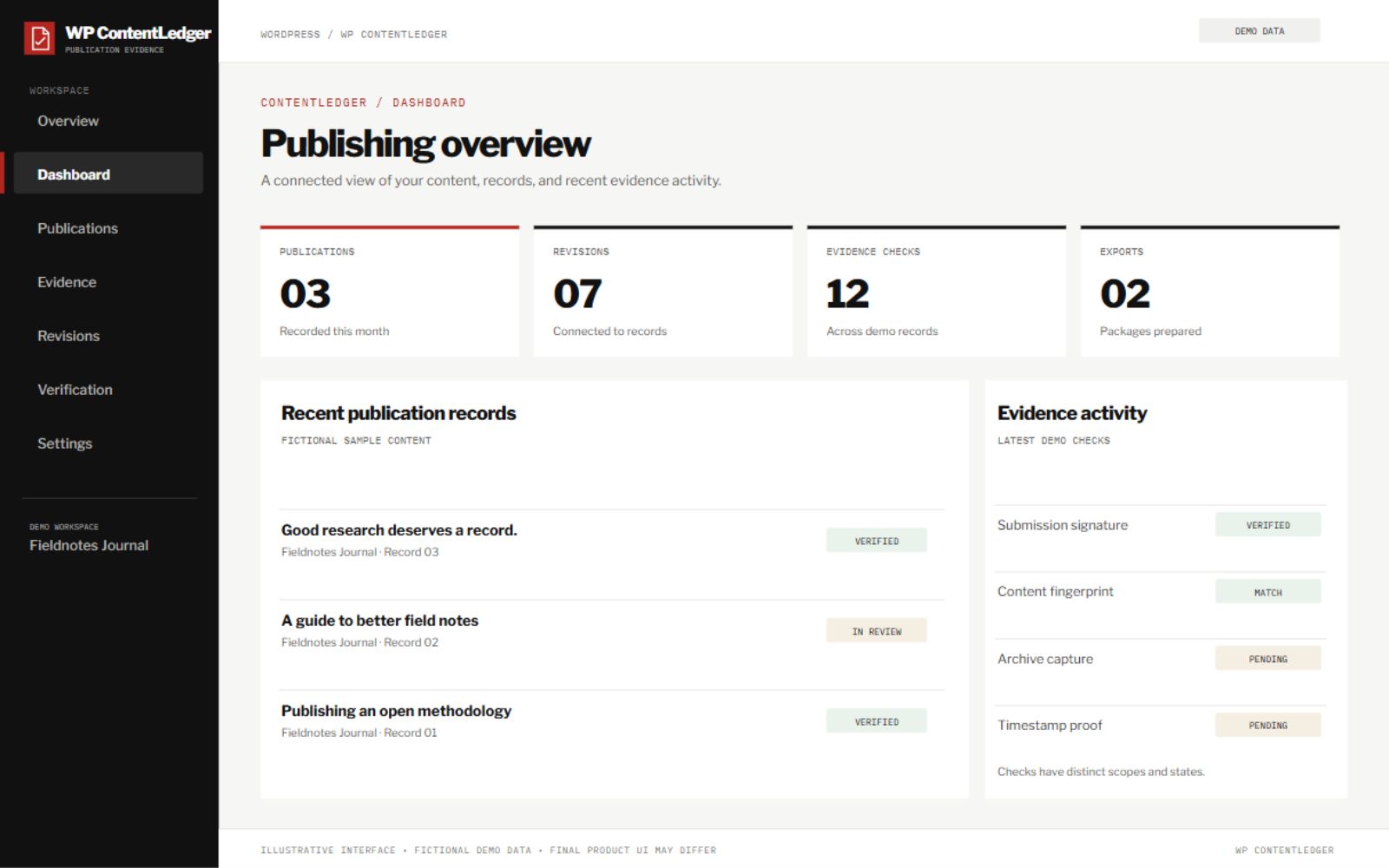
FIELDNOTES JOURNAL · RESEARCH
example.org/research/field-notes
01 / A closer look
From publishing in WordPress to inspecting a certificate. A short tour of how the pieces fit together.
EXPLAINER VIDEO02 / Inside the plugin
Stay in WordPress. Follow your records, review evidence status, and make your publishing history easier to understand.
A place to review publication records, background activity, and the evidence connected to your content.
ILLUSTRATIVE UISee content fingerprints, archive references, signatures, and timestamp results as separate checks with their own status.
ILLUSTRATIVE UI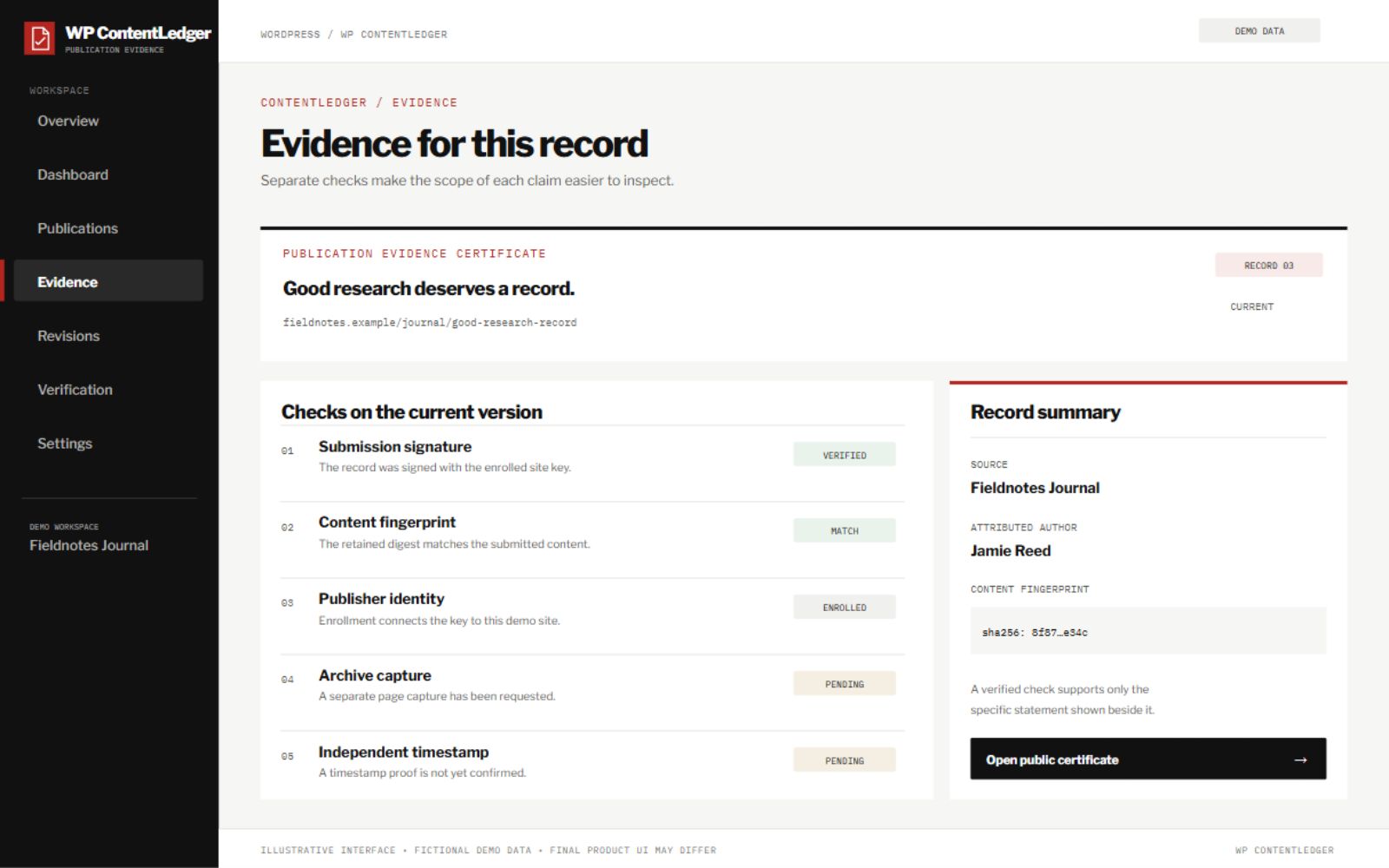
Follow recorded changes through linked revisions while keeping a stable certificate address for the publication.
ILLUSTRATIVE UI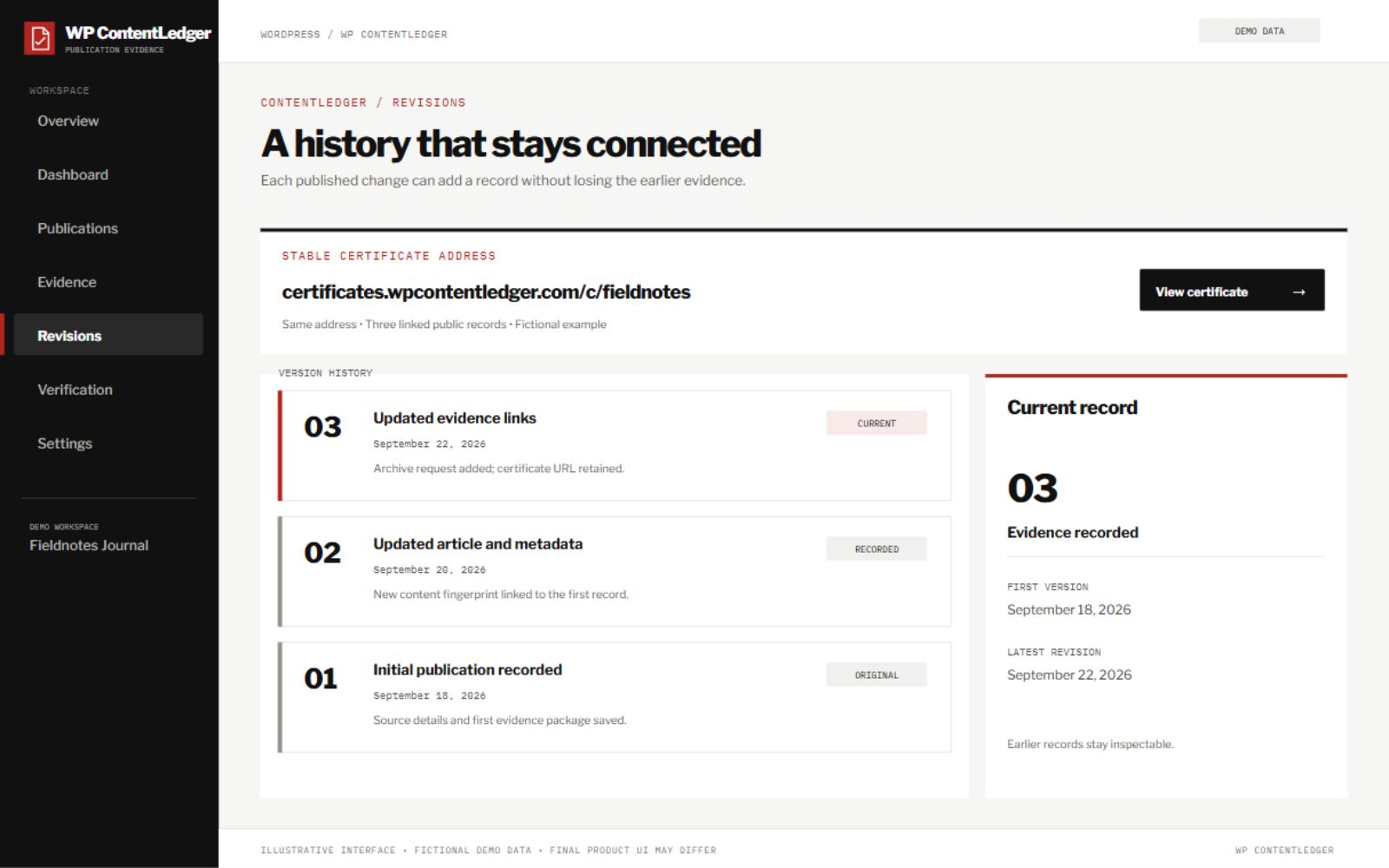
Export supported evidence and inspect it with the browser package checker, beyond the original WordPress installation.
ILLUSTRATIVE UI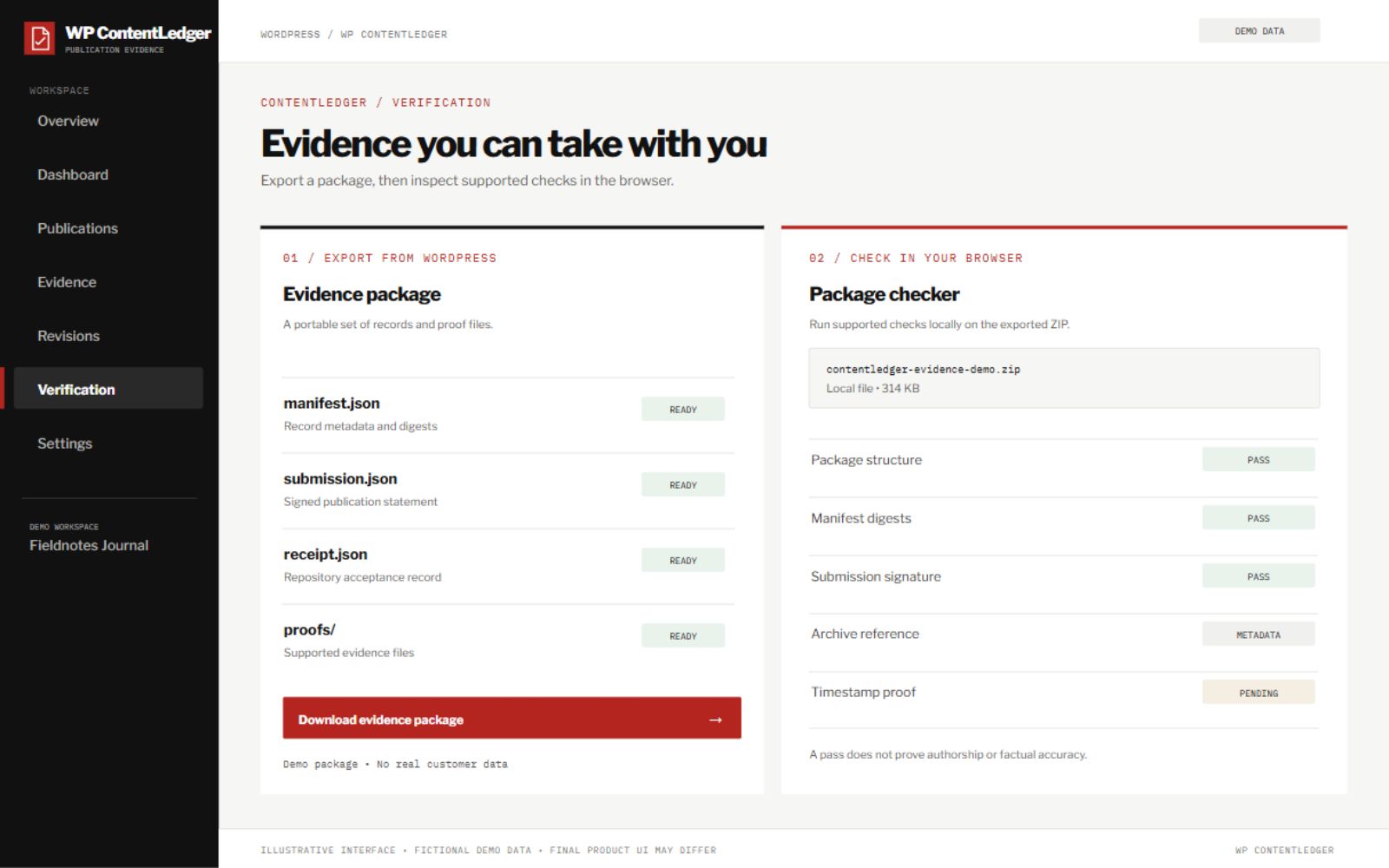
Illustrative screens with fictional demo data. The final product interface may differ.
EXPLORE THE WORKFLOW ↓03 / More than a publish date
For original research, expert articles, editorial teams, and the people who care about what happens after “Publish.”
Give each eligible publication a stable certificate address with its source, attributed author, recorded versions, and check results.
Connect new records when supported content or certified metadata changes. Readers can follow the history behind the current version.
Export supported manifests, signatures, and proof files. Inspect a package with the browser checker beyond the original WordPress site.
Submit eligible public URLs to the Internet Archive and connect verified captures when available. A request and a confirmed capture stay distinct.
Connect site-controlled signatures and OpenTimestamps evidence where enabled. See what is verified, what is pending, and what is unavailable.
Link source pages, publication metadata, revisions, and supporting evidence through structured, machine-readable records.
THE WORKFLOW IS CONNECTED
Create or update eligible public content in the editor you already use.
The plugin records publication data and content fingerprints, then submits the evidence to the certificate repository.
A stable certificate connects the source, recorded revisions, and the results of each evidence check.
THE ALLOWANCE, EXPLAINED
500 new certificates per site each month. Your busiest website does not borrow from the others.
Counted once when its evidence is first successfully accepted. New posts, new pages and backfilled content all use the allowance. Ordinary revisions, withdrawals and exact duplicate retries do not use new-certificate slots.
Reset is the first day of each month at 00:00 UTC. Each site gets its own 500 new-certificate slots. Unused slots do not roll over and cannot be transferred between sites.
Additional new certificates wait until that site’s next monthly allowance. Eligible revisions and withdrawals can continue. Previously issued certificates do not count again in the new month.
Ordinary revisions are included, subject to service safeguards against excessive use. A monthly new-certificate allowance is separate from certificate retention and service-availability terms.
FROM PURCHASE TO YOUR FIRST SITE
Purchase approval is handled manually. Once approved, your verification email is sent automatically. Activation is not instant.
Make the one-time $299 USD payment through PayPal. Use the email you want for your buyer account, or provide it separately if your PayPal email differs.
We check the completed PayPal payment and approve your purchase. Your account is linked to your buyer email.
Open the verification email sent after approval and confirm your buyer email address.
Install WP ContentLedger and authorize each site with an emailed connection code. Every connected site gets its own 500-per-month allowance.
04 / The $299 lifetime deal
A one-time $299 USD purchase for your own sites and client websites, with a separate new-certificate allowance on every site.
One license for the sites you own or manage.
PayPal · Manual approval · Buyer email verification
Keep your receipt. We review your payment before sending your verification email.
500 new certificates per site per UTC month. No pooling or rollover. Lifetime is the operating lifetime of the product and included service. Updates while maintained · 12 months of individual email support · 30-day full refunds after approval and access delivery. Read the license and terms.
A certificate connects records and attributed claims. It does not independently prove human authorship, copyright ownership, originality, or factual accuracy. Every check has its own meaning.
05 / Before you choose
What the plugin does, how the evidence works, and what to expect.
Ask about ContentLedgerLifetime refers to the operating lifetime of WP ContentLedger and its included certificate service, not your lifetime or guaranteed forever hosting. Existing LTD buyers retain unlimited eligible sites and the 500-new-certificates-per-site monthly allowance, with no recurring license fee or mandatory upgrade for core included service while it operates. Read the license and terms.
Accepted certificates and their recorded history are retained while the certificate service operates, subject to withdrawal, privacy, legal and abuse requirements. Uninstalling or temporarily disconnecting a site does not automatically delete its certificates. Keep portable evidence exports and your own backups. For a planned service closure, we provide at least 90 days’ notice and an export opportunity where reasonably possible. Read the license and terms.
Request a full refund within 30 calendar days after both purchase approval and access delivery; the window starts with the later event. You do not need to demonstrate a defect. We do not deduct payment-processing fees and target processing valid requests within five business days. PayPal/provider posting times vary. Mandatory consumer and payment-provider rights remain separate. Read the license and terms.
All updates released as part of WP ContentLedger are included while the product is maintained. Individual email support is included for 12 months after approval and access delivery, starting with the later event. Afterward, documentation, included updates, bug/security reporting and assistance with account access and service incidents remain available while the relevant service operates. We target an initial response within two business days, not a guaranteed resolution time. Read the license and terms.
A one-time payment of $299 USD covers WP ContentLedger for unlimited eligible sites you own or manage, including client sites. Each connected site has its own allowance of 500 new certificates per UTC calendar month. There is no per-site license charge. Lifetime means the operating lifetime of WP ContentLedger and its included service. Product updates are included while maintained; individual email support lasts 12 months. A 30-day full refund window starts after approval and access delivery. Read the license and terms.
No. Each site gets 500 new certificates per UTC calendar month. One site’s activity does not reduce another site’s allowance, and unused capacity cannot be transferred between sites or carried forward. Read the license and terms.
A new certificate counts once, when the repository first successfully accepts the evidence for a new publication. Backfilling older posts and pages uses the same allowance in the month they are first accepted. Ordinary revisions to an existing certificate, withdrawals and exact duplicate retries do not use another new-certificate slot. Ordinary revisions remain subject to service safeguards against excessive use. Read the license and terms.
Each site’s allowance resets on the first day of each month at 00:00 UTC. Unused allowance does not roll over. Once a site reaches 500 new certificates, additional new certificates wait for its next monthly reset. Eligible revisions and withdrawals can continue; existing certificates do not consume the new month’s allowance. Read the license and terms.
Yes. Connect sites you own or are authorized to manage, including client sites, using your verified buyer account. Each site has its own allowance. Unlimited sites is permission to use the plugin on those sites; it is not permission to resell or share your buyer account. Read the license and terms.
Pay $299 USD through PayPal. We manually check and approve the completed payment, then an automatic verification email goes to your buyer account email. Confirm that email, install the plugin and authorize each site with its email connection code. Approval is manual, so activation is not immediate. If your PayPal email differs from the email you want for your buyer account, provide both when requesting approval. Read the license and terms.
The publishing and certificate workflow is integrated into WP ContentLedger. The public certificate repository and browser package checker are companion destinations for inspecting the records and exported evidence.
Changes to supported content or certified metadata create a new recorded revision under the same certificate address. Submission and additional evidence checks can take time; their status tells you what has been accepted or verified.
No. When OpenTimestamps is enabled, a cryptographic commitment derived from the evidence is timestamped. Your article is not placed on-chain. A pending proof and an independently verified timestamp are different states.
Yes. Supported portable evidence packages can be inspected using the browser package checker. Its file checks run locally in your browser. What can be verified depends on the artifacts in the package; a fingerprint alone cannot recreate the article.
ContentLedger makes publication evidence easier to inspect and connect to its source. Search engines and AI systems decide how they use those records. No rankings, citations, or visibility gains are guaranteed.
Use the Buy with PayPal button in the pricing section to make your one-time $299 USD payment on PayPal. Keep your receipt and watch for your verification email after we approve the payment.
A RECORD OF PUBLICATION.